Classless Game Mode Module

Command the SpellDraft Grimoire

SpellDraft is a full Draft style game mode for WOTLK 3.3.5a private servers running on the AzerothCore system. Empower your server hosts with randomized ability draws, customizable passives, and limitless replayability.

UNLEASH PATHWAYS OF POWER

Core Module Features

SpellDraft reinvents standard progression by introducing a randomized leveling loop, direct passive custom trees, and rogue-like world items.

Ancient Spellbook

The SpellDraft Grimoire

The central UI hub of your draft experience. Open your Grimoire directly in-game by typing /spelldraft or clicking the Grimoire button on your talent frame.

The interface functions as a spellbook allowing you to view and equip your drafted abilities, access your active stats, apply accumulated talent points, and manage your endgame Prestige progression.
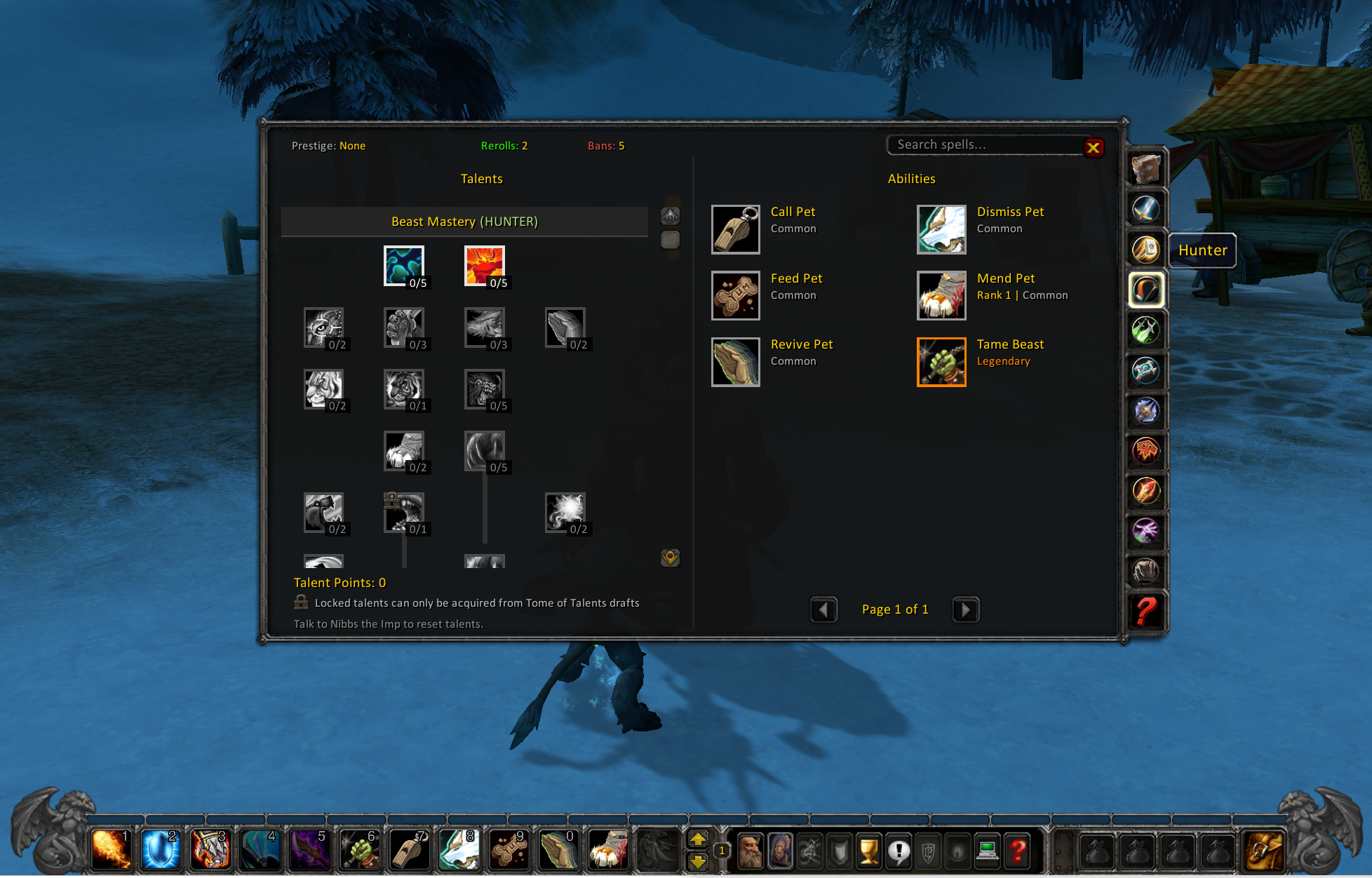
In-Game Menu Stats Tracker Clean XML UI
SpellDraft Grimoire: View/equip abilities, apply talents, and access prestige progression
Rogue-Like Levelling

Randomized Draft Mode

Traditional level-up progression is completely intercepted. Every level gained prompts players with a choice of three randomized class abilities drawn from the server database.

Server-side filters ensure players receive usable active cards. Specializations like stances/forms automatically unlock their basic starter kit abilities (e.g. Bear Form grants Maul and Demoralizing Roar) so you can immediately charge into battle.
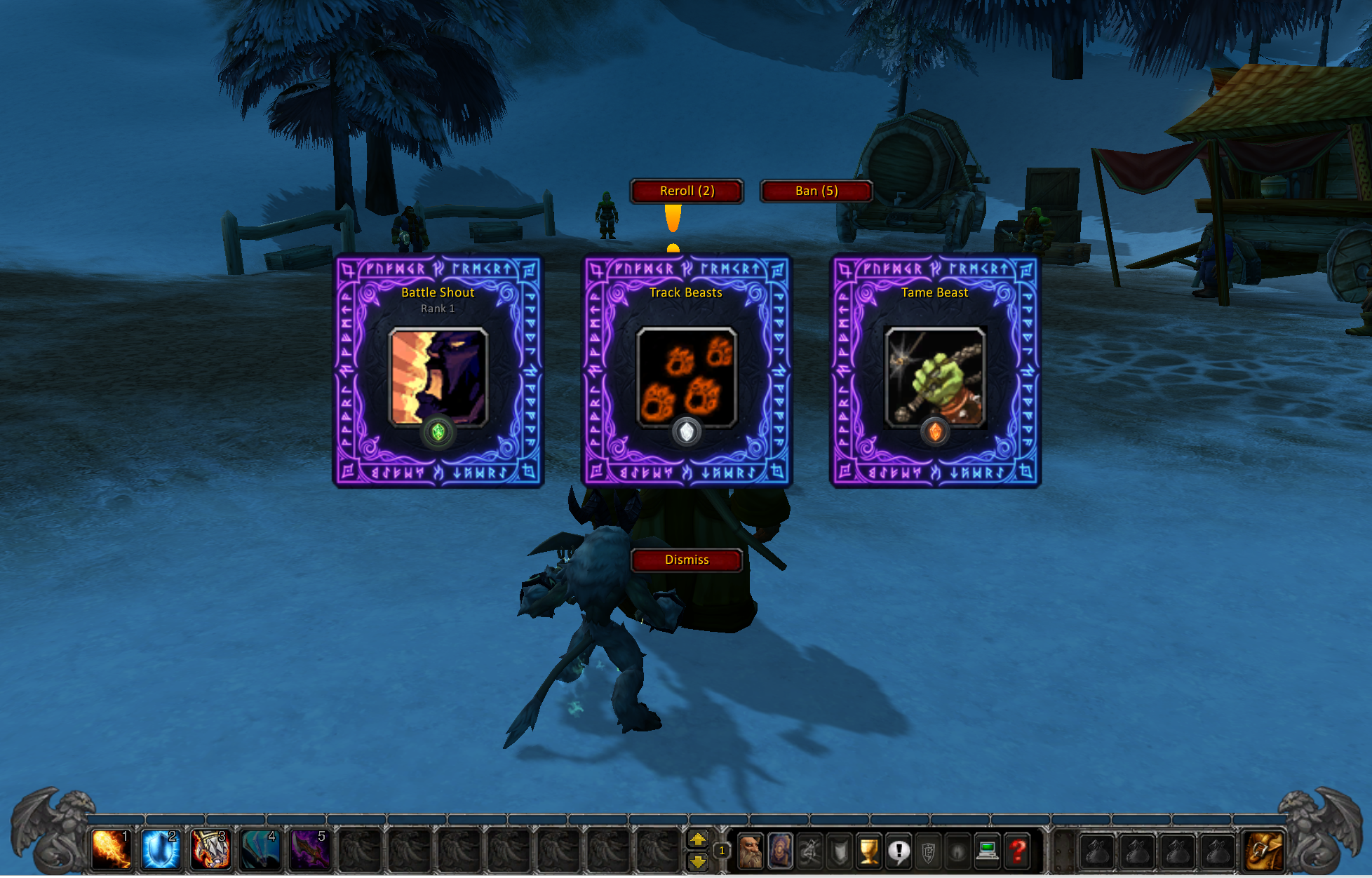
1-of-3 Card Draws Smart Class Filters Auto Spell Scaling
Spell Choice Interface: Choose one of three randomized spells drawn on level-up
Classless Trees

Passive Talent Rework

Each level up grants players 1 Talent Point to allocate into passive talents across any class tree. No more rigid presets—mix and match passives to support hybrid spell builds.

Playstyle-defining major passives (like Titan's Grip, Tree of Life, or Metamorphosis) are locked from point purchases and must be drafted through world drops. Need to change strategy? Speak with Nibbs the Imp in starting zones or capitals to reset and refund spent points for free.
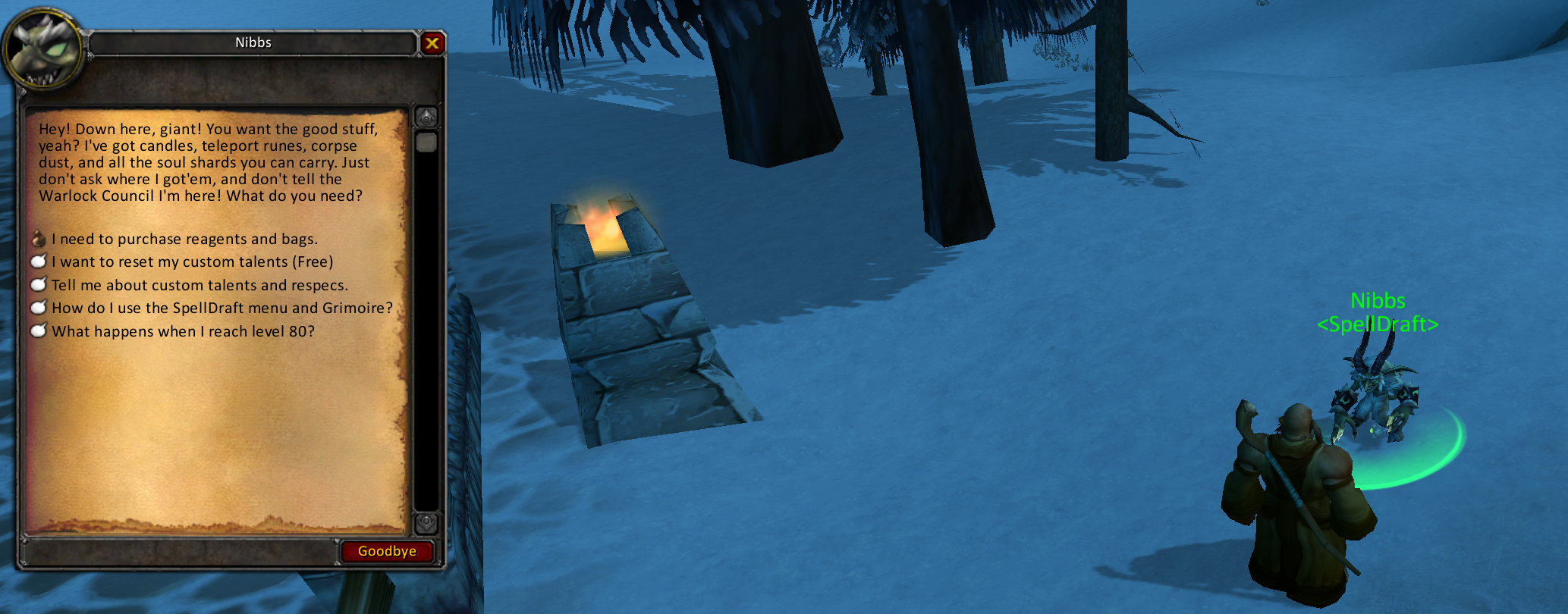
1 Talent Point/Level Locked Capstones Free Respecs (Nibbs)
Nibbs the Imp: Talk to him in starter zones or capitals to reset and refund your talent points
Endgame Replayability

Prestige & Rebirth System

Reaching level 80 is just the beginning. Travel to faction capitals to converse with Chromie and initiate Prestige Rebirth.

Your level resets to 1 (or 55 for Death Knights), and your drafted spells/talents are wiped, mailing back your bags and gear safely. In return, you receive a permanent +50% Experience Boost, a custom Prestige Title, scaling starting reroll/ban counts, and 10 Prestige Tokens to spend.

Unlock the Prestige Rewards Shop inside your Grimoire menu to purchase rare mounts, vanity companion pets, account-bound heirlooms (+XP scaling), scrolls, and transformation toys using your earned Prestige Tokens.
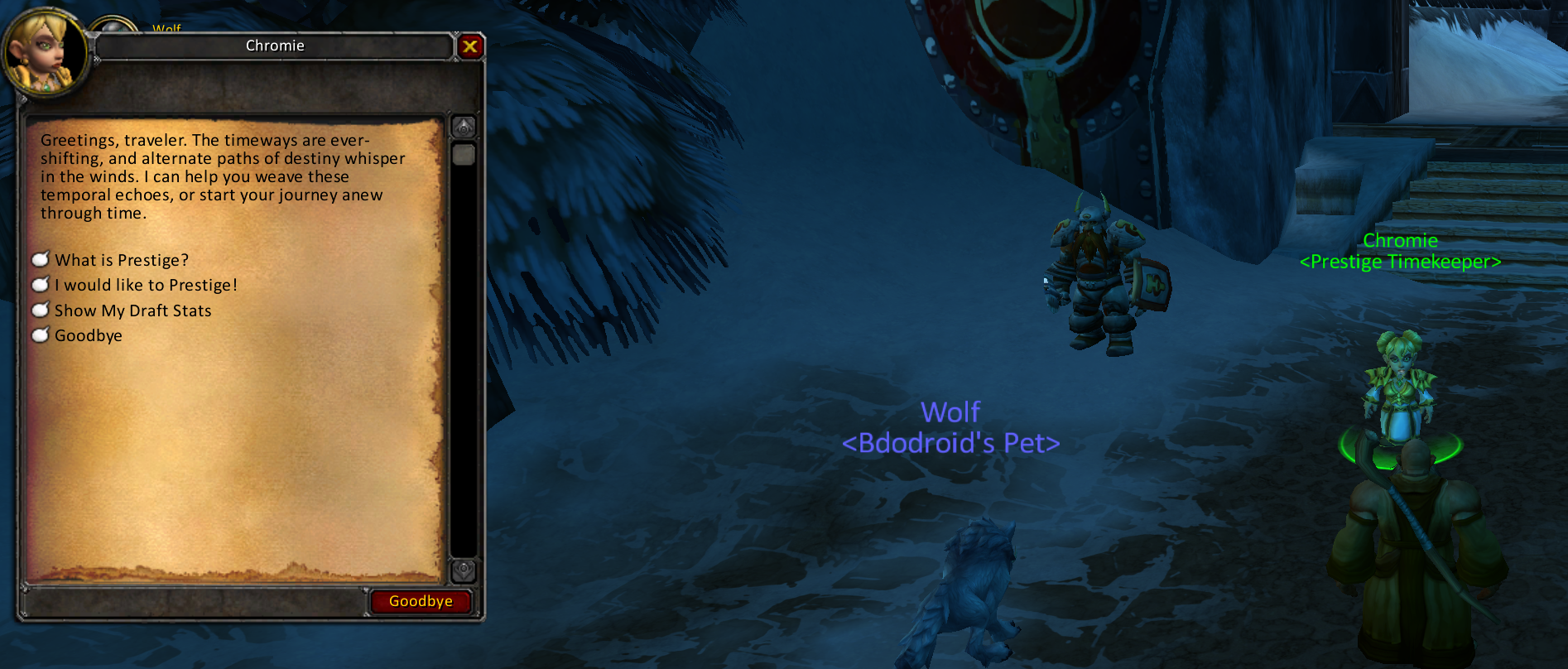
Rebirth to Level 1 / 55 Prestige Rewards Shop 10 Prestige Tokens / Run
Prestige System: Reset level at Chromie to earn 10 tokens and unlock the custom heirloom shop
RNG Loot Modifiers

Mystic Enchantments

Armor and weapons of Uncommon quality or higher have a chance to roll a Mystic Enchant when looted, crafted, or won. These unique enhancements append custom properties directly onto the item's tooltip.

Modifiers span three dynamic categories: Glyph-tier buffs (granting passive class advantages), Combat Procs (triggering spell combos, such as fireball casts launching free fire blasts), and Visual Form morphs (allowing druids to shapeshift into legendary forms like the spirit bear Arcturis).

Visit Nibbs the Imp to manage your rolls. Drag items into the mystic workbench to Reroll, Imbue, or Transfer enchants between gear. Spend a Prestige Token on a Golden Imbue for a guaranteed Epic-or-Legendary tier enchant!
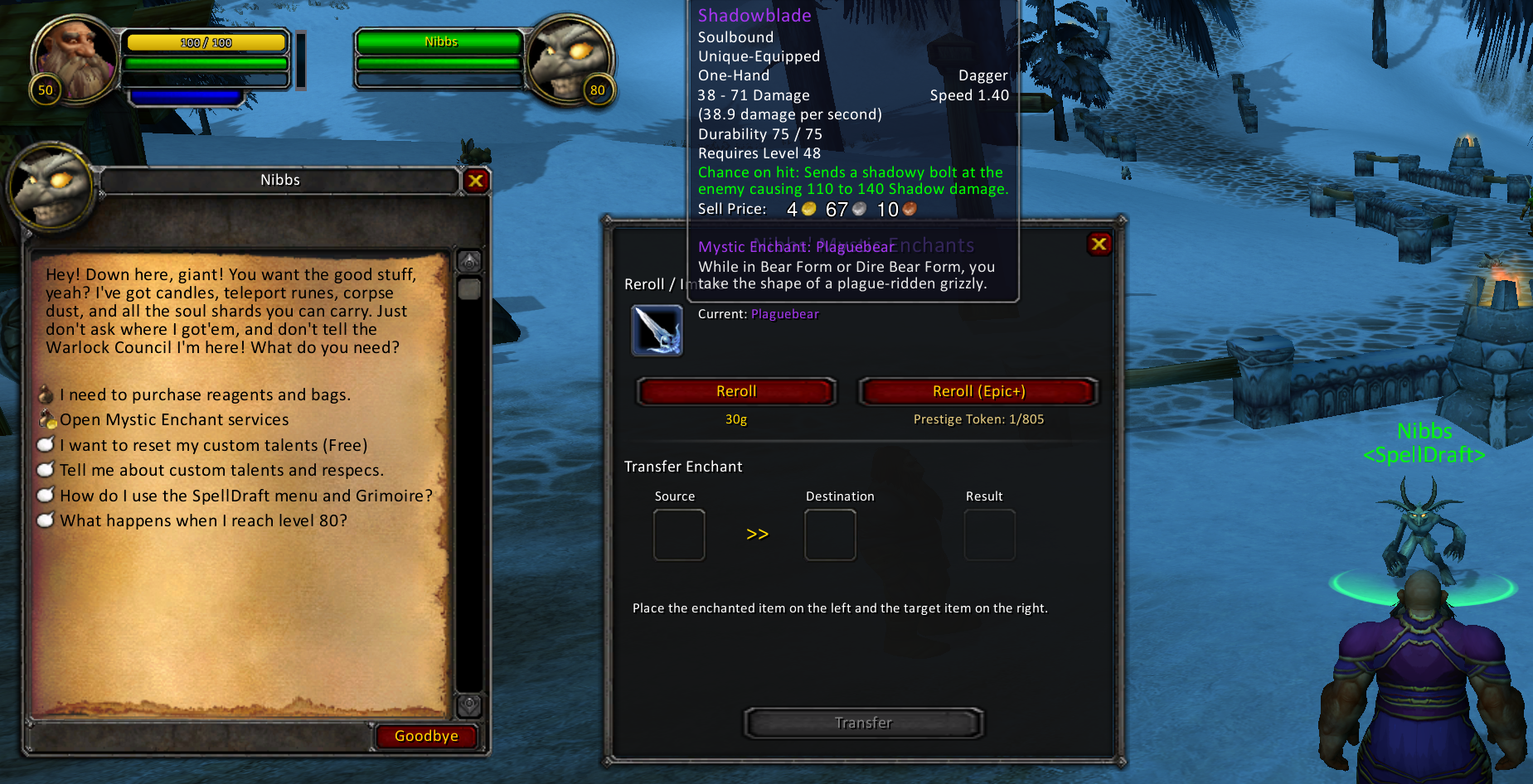
Random Loot Rolls Nibbs Rerolling & Transfer Golden Imbues (Epic+)
Mystic Enchants: Reroll, Golden Imbue, and Transfer custom combat procs and cosmetics via Nibbs the Imp
World Discoveries

Cosmetic & Custom Glyphs

Personalize your spellbook and aesthetic with rare custom glyph drops. Socket them directly into the standard Glyphs panel (level 15+) to customize your abilities and forms.

Discover Minor Glyphs that restore Blizzard's beta visual options (like the White Bear, Black Bear, Red Lynx, Forest Lynx, or Black Wolf) and the custom Glyph of the Orca.

Discover Major Glyphs that introduce brand new combat mechanics, such as the Glyph of the Zealot which allows your melee strikes to rarely unleash an automatic Exorcism in battle.

Glyphs drop rarely from any creature in the world, with bosses holding a much higher rate. Or, seek out the three Forgotten Grimoires hidden in remote locations across Duskwood, Silithus, and Grizzly Hills to secure guaranteed glyph unlocks!
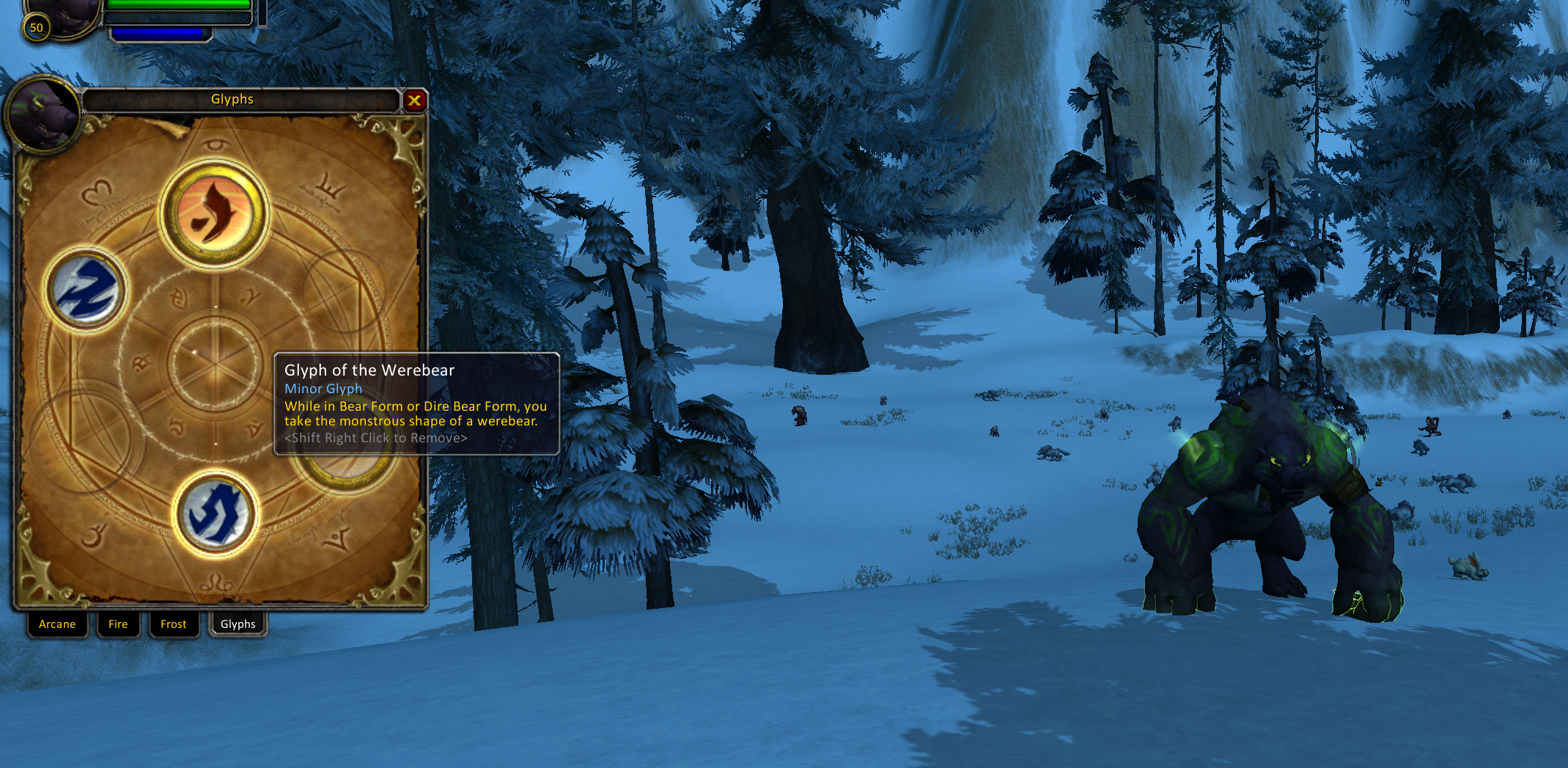
Restored Beta Morphs Major Combat Effects Forgotten Grimoire Hunts
Glyph Panel: Socket minor visual overrides and major combat effects through the standard UI
Optional Integration

Multi-Class Active Summons

Tired of pet limits? Integrate the optional mod-multiclass-summons to bypass default class boundaries.

This allows a single character to bypass class boundaries to summon and control all summonable creatures (such as demons, water elementals, ghouls, and other pets) simultaneously. The first creature active gets standard pet bar controls, while additional creatures fight alongside you as active guardians.
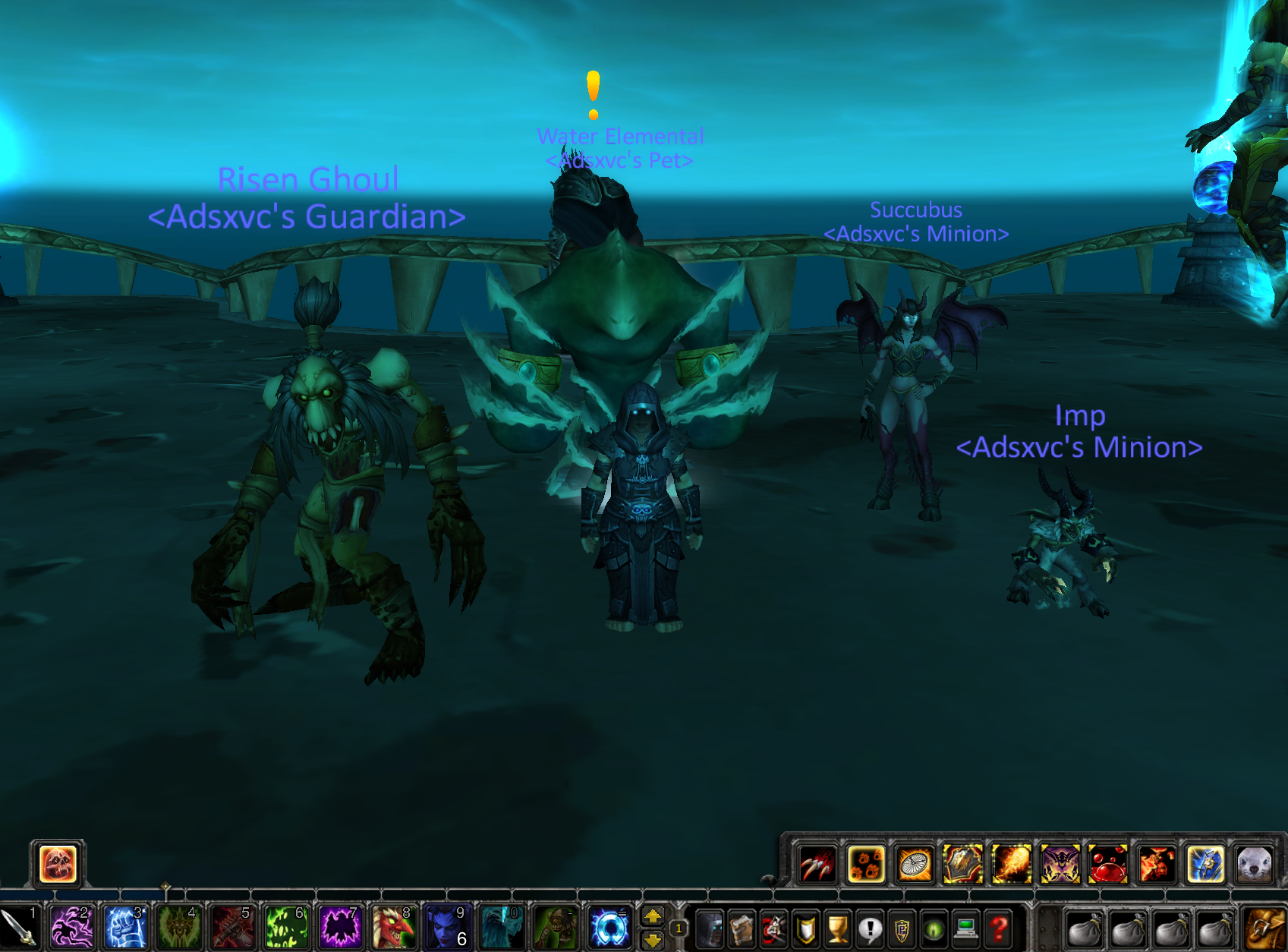
Multiclass Summons Mod: Summon and control multiple demons, ghouls, and elementals at once
World Drop Economy

Draft-Altering Consumables

Defeating enemies in the world grants a chance to obtain magical items to prune and customize your drafts. Bosses have a significantly increased chance to drop these items.

  • Scroll of Reroll

    Adds +1 Reroll charge, letting you roll again on draft choices.

  • Scroll of Ban

    Adds +1 Ban charge, permanently filtering unwanted spells out of your pool.

  • Lost Grimoire

    Consuming this grimoire immediately triggers a bonus active spell draft.

  • Tome of Talents

    Triggers a draft on the locked talents table, allowing you to learn major, playstyle-defining capstones (like Titan's Grip or Metamorphosis).

📜 DEV CHRONICLES 📜

Repository Changelog

Explore real-time pushes, updates, and bug fixes fetched dynamically from the GitHub master branches.

New Feature Enchants / Glyphs

Mystic Enchants & Glyphs

Implemented randomized Mystic Enchants with custom procs, alongside cosmetic and custom combat glyphs hidden in world grimoires.

by bdodroid
Latest Pushes Feature / Fixes

Action Bar Stack & Kit Spells

Enabled Shaman totems and Druid shapeshift bars to coexist and stack on the client UI. Fixed kit spell persistence upon relog.

by bdodroid
Recent Updates System

Talent Points & Passives

Introduced custom Talent Points earned on level-up. Created C++ level hooks to link with client-side grimoire panels.

by bdodroid
Core Patch Refactor

Combo Points Addon Broadcast

Staged automated C++ core patches to broadcast rogue combo points to non-rogue classes. Spawned Nibbs in starting zones.

by bdodroid
🔧 INSTALLATION 🔧

How To Get Up And Running

Configure and compile your own classless draft server environment. Follow the instructions below to install the server modules and client interfaces.

Step 1: Setup a WOTLK 3.3.5a Server Base

Before installing SpellDraft, you need a running WOTLK 3.3.5a server compiled on the AzerothCore system. You can set up your server environment using **Dad's MMO Lab** and/or **The Lab GUI**:

Note: Make sure your server contains the official AzerothCore mod-ale (Eluna Lua Engine), which is required to process SpellDraft's gameplay logic.

Step 2: Clone SpellDraft and Summons Repositories

Open your server's module folder. If you installed your server manually via Dad's MMO Lab, this folder is typically located in ~/wow-server-playerbots/modules/.

Run the following clone commands inside your terminal to download the modules:

Bash Terminal - Clone Modules
# Navigate to your server modules directory
cd ~/wow-server-playerbots/modules/

# Clone the core SpellDraft module
git clone https://github.com/bdodroid/mod-spelldraft.git

# (Optional) Clone the multiclass summons module
git clone https://github.com/bdodroid/mod-multiclass-summons.git

Step 3: Run the Staging Script and Compile

Navigate to the mod-spelldraft folder and run the automated installation script. This script automatically stages configuration files, applies core DBC overrides, and stages the C++ patches.

Bash Terminal - Install Script
# Navigate to mod-spelldraft
cd mod-spelldraft

# Run the automated installer script
./install.sh

Once the script completes, recompile your server to link the new C++ modules (required to handle custom combo points and multiclass pet actions):

  • Docker (MMO Lab): Rebuild the worldserver container by executing docker compose build ac-worldserver (or docker compose up -d --build) from your server root.
  • Local Compile: Run your CMake and compilation chain to compile the newly added C++ files.

After compilation, start your server. The module will automatically apply migrations and database items on launch!

Step 4: Client Files Merge

Set up your local World of Warcraft 3.3.5a game client to render the Grimoire, card selection drafts, and custom combo points:

  1. Merge the client files folder: Copy or merge the contents of the wow-client/ directory from the cloned repository directly into your main World of Warcraft client installation folder.
  2. Verify correct placement: Ensure the files have merged into their respective subdirectories:
    • wow-client/Data/patch-P.mpq should merge into World of Warcraft/Data/patch-P.mpq (Note: Keep the path lowercase "data/" if running on Linux or Steam Deck).
    • wow-client/Interface/AddOns/SpellDraft/ should merge into World of Warcraft/Interface/AddOns/SpellDraft/.
  3. Restart & Log In: Restart your server and your game client. Log in, open your chat, and type /spelldraft (or click the Grimoire tab on your talent screen) to verify the installation!

Build Your Classless World

Download SpellDraft today, configure it to your liking, and customize the ultimate randomized RPG experience on your own private server.